



Hybrid is no longer a backup plan. It's the default.
When organizations plan a major event now, they don't ask "should we offer remote participation?" They ask "how do we make remote participation feel as valuable as being there?" The difference between those questions is everything.
A poorly executed hybrid event creates two disconnected experiences: in-person attendees have a great event, remote attendees watch a conference feed like a YouTube video. A well-executed hybrid event feels like one event with two access points. Remote participants feel present. In-person attendees see evidence of remote engagement (Q&A, polls, reactions). The event's energy flows in both directions.
That level of integration requires deliberate strategy, proper technology, and production expertise. This guide walks through what professional hybrid event production actually involves—from technology infrastructure through audience engagement tactics through the operational workflows that hold it all together.
Delivering a connected hybrid experience requires AV production Canada infrastructure that serves both audiences equally. The best hybrid producers operate as a full-service audio visual production company Canada organizations trust for simultaneous in-room and remote delivery. This means event production Canada capabilities including redundant streaming, professional encoding, and dedicated remote audience management. Whether the format is a conference production Canada engagement or a single-city corporate event production Canada broadcast, the technical backbone must support real-time interaction across every channel. Look for event production company Canada partners with proven hybrid portfolios and the ability to scale event production Canada-wide without compromising quality.
Understanding the technical complexity is especially important when planning conference AV setups or large event production initiatives.
What Hybrid Event Production Actually Means in 2026
Hybrid isn't just "record the conference and stream it live." That's streaming—a completely different endeavor.
Hybrid means designing a single event experience that works for both modalities. It means your remote attendee experiences the same pacing, the same interactive moments, and the same sense of occasion as someone in the room.
The Evolution of Hybrid
In 2020-2021, hybrid was reactive. Venues went into lockdown, organizations pivoted to emergency streaming. Video conferencing feeds appeared on room screens. It worked, barely.
By 2024-2025, hybrid became strategic. Organizations realized that remote attendance wasn't temporary—it was here to stay. Geographic constraints on attendance dissolved. A Toronto company could attract speakers and attendees from other cities without expecting them to travel. This shift opened new possibilities for event production companies Toronto to expand their reach.
In 2026, hybrid is sophisticated. There are proven best practices. Technology has matured. Production companies have refined the craft.
Hybrid vs. Virtual vs. In-Person
These are distinct events with different production needs.
In-Person Events - Attendees physically present in one or multiple venues - Production focus: stage design, lighting, acoustic quality, sightlines, physical experience - Engagement: networking rooms, breakouts, meal experiences - No streaming or remote technology required
Virtual Events - Attendees exclusively remote, typically on Zoom or similar platforms - Production focus: content presentation, speaker engagement via camera, interactive polling, breakout rooms - Engagement: chat, Q&A, polls, virtual booth experiences - Entirely dependent on stable internet and conferencing software
Hybrid Events - Attendees both in-person and remote, often across geographies - Production focus: delivering the same message and energy to both audiences, integrating remote participation into the in-person experience, managing two parallel technical streams - Engagement: unified Q&A that includes both audiences, interactive moments visible to both, shared experience even across distance - Requires competence in both in-person production and streaming technology
Most organizations underestimate the complexity. They think hybrid is "in-person event + streaming feed." Actually, it's a completely new event type requiring distinct production approaches.
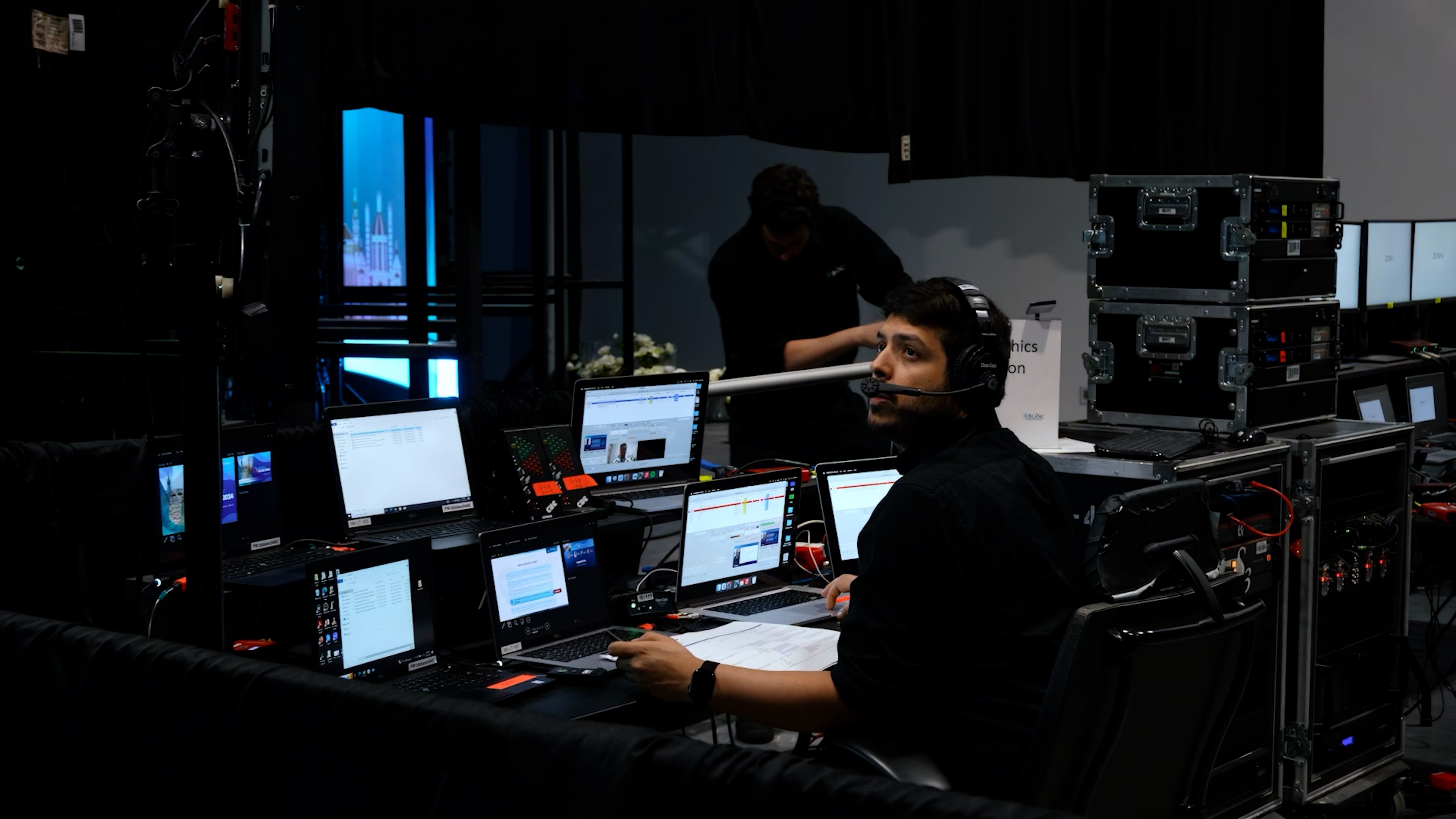
Studio-Quality vs. Venue-Based Hybrid Setups
There are two approaches to hybrid event production. Each has tradeoffs.
Venue-Based Hybrid (Event Happens in a Physical Space)
The event takes place in a physical venue with in-person attendees. Remote participation is integrated through cameras, video conferencing, and streaming infrastructure at the venue.
Advantages: - Energy and presence of physical attendees creates momentum - Physical networking and hallway conversations happen (valuable in-person benefit) - Speakers prefer presenting to a room with people vs. a camera alone - Single setup location simplifies logistics - Event feels "real" with a live audience
Disadvantages: - Remote participants are inherently secondary—they're watching the event happen elsewhere - Integrating remote Q&A and participation requires active moderation - Technical complexity: managing cameras, capture, streaming, and audience interactivity simultaneously - Internet reliability is critical—if streaming fails, you lose remote audience - Can't reliably put remote participants on stage with in-person speakers (technical challenges)
Best for: - Product launches or announcements where physical presence matters - Conferences with local or regional audiences who can attend in-person - Events where the in-person experience is the priority and remote is a bonus - Smaller remote audience (under 1,000 remote viewers)
Studio-Based Hybrid (Content Originates in a Controlled Studio)
The primary event is produced in a professional broadcast studio with professional lighting, cameras, and production control. In-person attendees (if any) sit in an adjacent viewing area or watch alongside remote participants. The studio setup controls every variable.
Advantages: - Complete production control—lighting, camera angles, audio quality, visual polish - Remote participants get broadcast-quality video, not a room camera - Reliable, consistent video quality regardless of venue internet - Easy to integrate remote speakers into a polished presentation - Professional appearance and feel - Can accommodate 10,000+ simultaneous remote viewers without video quality degradation - Better for international or truly distributed audiences
Disadvantages: - Requires a professional studio facility (higher cost) - Loses the energy of a live physical audience (speakers present to cameras, not people) - Requires more sophisticated production team - In-person attendees (if present) are watching screens, not the live presentation - Feels more like a broadcast than an event (different energy)
Best for: - Events with predominantly remote audience - International or distributed audiences across time zones - Announcements or presentations where broadcast quality is critical - Organizations that can regularly use a studio (cost justifies permanent investment) - Events requiring multiple simultaneous streams or complex production - Awards shows or events where visual polish is essential
Hybrid Hybrid (Best of Both)
Some sophisticated organizations use both. The primary event happens in a venue (capturing in-person energy), but critical moments (keynotes, announcements) are also produced in a studio with professional cameras and broadcast-quality setup.
This maximizes both the energy of live attendance and the quality of remote viewing. It's also maximally complex and requires significant coordination.
The Hybrid Technology Stack
Professional hybrid event production requires multiple technologies working together. Understanding the pieces helps you evaluate vendors and plan your technical approach.
Content Capture and Cameras
Venue-Based CaptureMain stage camera(s) stationary wide shot capturing the stage and speakers - Speaker close-up camera: tight shot on the presenter for emphasis - Audience camera: captures audience reactions and Q&A (psychological engagement for remote viewers) - Document camera: for presenters with physical materials (samples, artifacts, diagrams) - Slide/presentation feed: direct capture from presenter's laptop or presentation server
Studio-Based CaptureMultiple professional cameras with operator control (pan, tilt, zoom) - Professional lighting setup ensuring consistent, flattering appearance - Studio monitors showing the presentation and remote participant feeds - Teleprompter (if speakers need notes) - Green screen or physical backdrop for branding
Encoding and Streaming
Streaming EncoderHardware or software device that takes video/audio inputs, compresses them, and transmits to a streaming platform - Encodes at multiple bitrates (adaptive streaming) so viewers on slow connections get degraded quality instead of buffering - Includes failover: if primary encoder fails, secondary encoder takes over automatically
Streaming PlatformVimeo Live, YouTube Live, or custom platform - Handles distribution to remote viewers - Usually includes viewer authentication, chat, Q&A, polling - Must support the anticipated viewer count without degradation
Encoding BitratesTypical setup: 720p at 4 Mbps for standard viewers, 1080p at 7 Mbps for high-bandwidth viewers - Adaptive bitrate automatically adjusts based on viewer's connection speed - Upload bandwidth requirement: 7-10 Mbps for reliable 1080p streaming (often faster than your venue's actual upload speed—hence the emphasis on testing)
Video Conferencing Integration
If you're including live Q&A or bringing remote speakers into the event:
Video Conferencing PlatformZoom, Microsoft Teams, Google Meet, or similar - Remote participants dial in or join via web - Moderator can select who unmutes, who goes on screen - Remote speakers' video feed and audio integrate into the production
Integration PointsRemote video feed displays on LED wall or projection screen for in-person audience - Remote speaker audio goes through the venue audio mixing console - In-person audience audio is fed back to remote participants so they hear the room
Content Management and Playback
Media ServerComputer or appliance managing video playback, graphics, transitions - Handles presentation switching, video playback, lower-third graphics - Control via touch panel, keyboard, or automation
Backup ContentLocal copies of all videos, slides, graphics - Secondary server with identical content (if primary fails, you switch to secondary) - No reliance on cloud-based content during the event (too risky if internet fails)
Audio Systems
Mixing ConsoleManages all audio sources: speaker mics, interpreters, backup audio, remote participant audio - Real-time mixing, level adjustments, EQ - Creates multiple audio outputs: main PA, confidence monitors, streaming audio, interpretation booth
Wireless Microphone SystemsMultiple channels of wireless mics for speaker and audience participation - Backup systems so a dropped mic doesn't kill audio
Interpretation Systems (if applicable) - Separate audio feed to interpretation booth - Interpreter headsets sending translated audio to wireless systems - Remote participants get clean audio without interpretation crew noise
Connectivity and Backup
Primary Internet10-25 Mbps upload minimum for 1080p streaming - Hardwired Ethernet from venue to encoding equipment (not Wi-Fi) - Dedicated internet for production (not shared with attendee Wi-Fi)
Backup InternetSecondary ISP (if available at venue) or LTE cellular hot spot - Automatic failover if primary internet drops - Without backup, internet failure kills your stream
Network InfrastructureEthernet runs to all equipment locations (cameras, encoding, streaming) - Network switch managing all devices - PoE (Power over Ethernet) powering wireless cameras and audio gear where possible
Master Control and Automation
Show Control SoftwareCrestron, Extron, or custom software managing all technical systems - Single control point for lighting, audio mixing, video playback, camera control - Automation sequences that execute with one button press (instead of manually coordinating 5 technicians)
Control SurfacesTablet, console, or physical buttons for operators to control the event - Real-time monitoring of all system status.
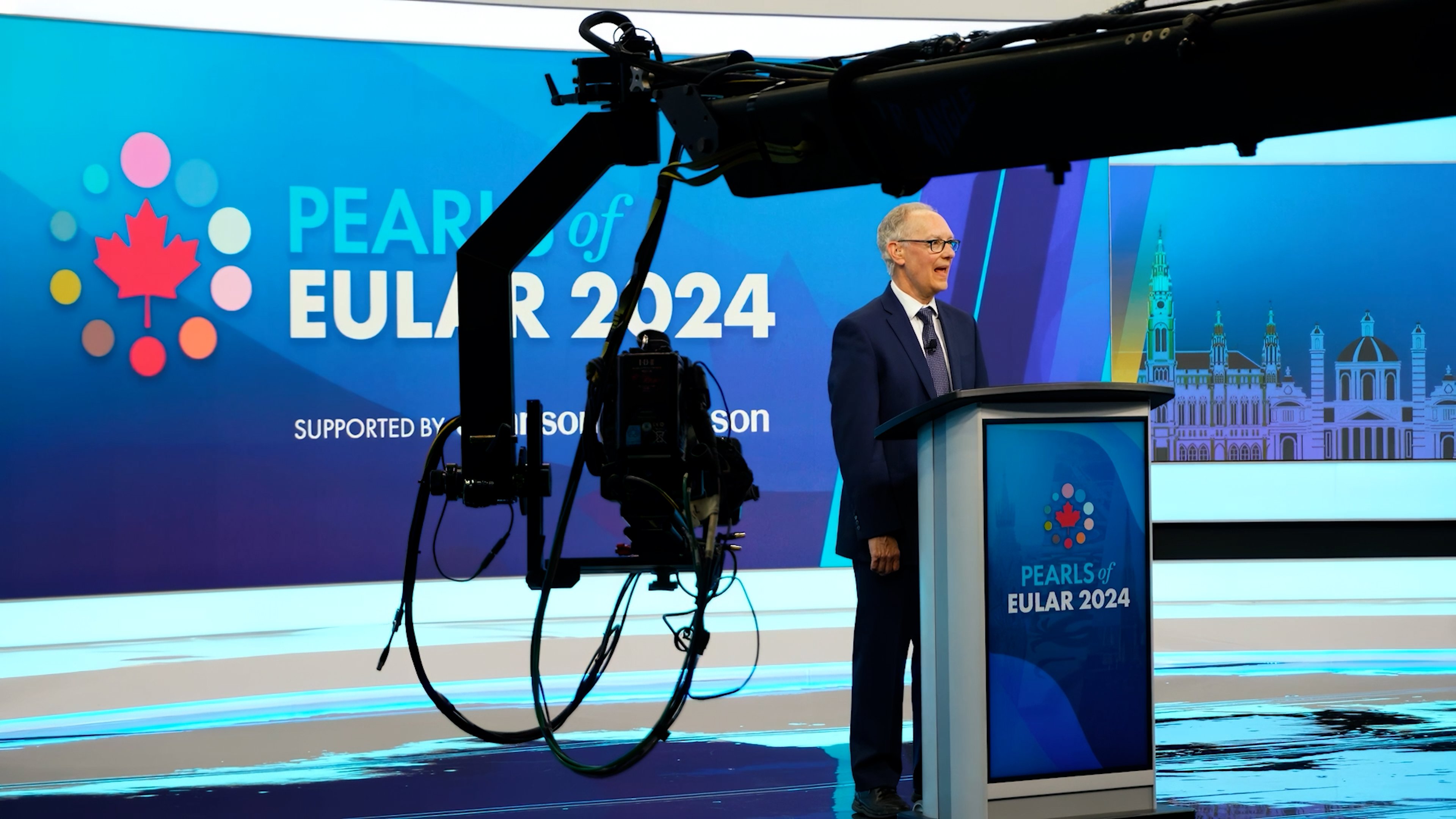
Engagement Strategies for Remote Attendees
A video feed of a stage is passive. Engagement requires active production and design.
Interactive Elements That Work
Live PollingPresent a poll question on all screens (main stage, remote viewer display) - Results appear in real-time - Creates a moment of shared engagement across both audiences
Unified Q&AModerated Q&A where questions come from both in-person and remote attendees - Questions asked and answered on stage, visible to both audiences - Remote attendees feel heard when their question is answered publicly
Chat and Social WallLive chat visible on event screens and streaming platform - Social wall displaying tweets or social media mentions with event hashtag - Gives remote attendees a voice and creates sense of community
Remote Speaker IntegrationBring a remote expert onto the stream live (via video conferencing) - Remote speaker appears on screen alongside in-person host - Enable conversation between remote and in-person participants
Audience Reaction CaptureShow audience reactions (applause, laughter, energy) via camera on remote stream - Creates psychological connection—remote viewers see that in-person attendees are engaged - More effective than narrator saying "the room is really excited"
Gamification and ContestsRemote attendees vote on outcomes (product features, decisions, trivia answers) - Winners get recognition or prizes - Keeps remote audience active and engaged
Pacing and Timing Considerations
Different Tolerance for Passive ViewingIn-person attendees can sit through longer presentation blocks because of physical presence and environmental energy - Remote attendees fatigue from screen time faster and lose attention after 20-30 minutes of passive viewing - Build breaks and interactive moments every 20-25 minutes of presentation
Time Zone Challenges If your audience spans multiple time zones: - Record sessions for on-demand playback - Offer replay access for remote attendees who join live in their local timezone but want to watch missed sessions - Consider staggered start times if the gap is large (one session at 9am EST, another at 2pm EST to catch West Coast attendees)
SynchronizationRemote participants watch on a slight delay (5-15 seconds) due to encoding and streaming - This creates issues with live polls (in-person audience answers before remote audience has processed the question) - Moderate timing carefully so both audiences feel synchronized
Content Optimization for Remote Consumption
Slide DesignLarger fonts (40+ point minimum for readability on laptop screens) - Fewer bullets per slide (3-4 instead of 8-10) - High contrast (dark text on light background, or vice versa) - Minimal animation (animated bullets distract from the message)
Video and DemonstrationRecord high-quality videos of demonstrations (not live screen captures which are often too small) - Zoom in on important details - Narrate clearly so remote viewers understand what they're seeing - Playback videos on large screens so in-person audience can also see detail
Camera WorkAvoid extreme wide shots (speaker becomes a tiny figure on screen) - Vary between wide (showing the setting) and close-up (showing emotion and gesture) - Show speaker's eyes—connection happens through eye contact, even on video
Graphics and Visual DesignUse branded lower-third graphics identifying speakers - Use text overlays for key takeaways or data points - Maintain consistent visual design throughout (matches brand, feels polished)
Bandwidth, Redundancy, and Technical Risk Planning
Hybrid events live or die by technical infrastructure. A single point of failure cascades.
Internet Bandwidth Reality Check
The Challenge Most venues have adequate download bandwidth but insufficient upload bandwidth for streaming.
Typical scenario:In-person event has 500 attendees - Venue has 50 Mbps download, 10 Mbps upload - Attendees demand Wi-Fi (uses downstream bandwidth) - Streaming encoder needs 10 Mbps upstream (uses upstream bandwidth) - Interpretation booth needs dedicated connection - Conflict: not enough upload bandwidth for streaming + in-person attendee Wi-Fi
Solution Options:Dedicated ISP for production (separate from attendee Wi-Fi) - Cellular backup using LTE hot spot (usually slower but available) - Reduce streaming quality (720p at 4 Mbps instead of 1080p at 7 Mbps) - Use a streaming CDN that accepts multiple connection types and fails over automatically
Test Every VenueUpload speed varies wildly by location and ISP - Always test the actual venue's upload speed 48 hours before - Never assume "it's a major hotel, so their internet is good"
Redundancy Architecture
Critical Single Points of FailureInternet connection (primary path for streaming) - Encoding equipment (converts raw video to streamable format) - Streaming platform (distributes to remote viewers) - Audio mixing console (audio from speakers and ambient noise) - Video content server (plays slides and videos)
Redundancy Approach: Each critical component should have a backup that takes over automatically or with minimal intervention.
Streaming Path RedundancyPrimary: Hardwired Ethernet to ISP's modem, then to streaming encoder, then to streaming platform - Backup 1: Secondary Ethernet connection (different ISP if available) to backup streaming encoder - Backup 2: Cellular hot spot connected to tertiary streaming encoder - Automatic failover: if primary link drops, secondary encoder starts streaming within 2-3 seconds
Video Content RedundancyPrimary media server running the presentation - Backup media server with identical content, prepped and ready - If primary server fails, cut over to backup (manual switch or automated) - Total downtime: 30-60 seconds
Audio RedundancyPrimary mixing console managing all audio - Backup console configured identically, also receiving all audio inputs - If primary fails, switch to backup - Total downtime: 10-30 seconds
Testing and Contingency Scenarios
Test All the Failure ModesInternet failure: Does backup internet work? - Encoder failure: Can you switch to backup encoder and keep streaming? - Camera failure: Do you have a backup camera for that position? - Audio failure: Can you continue with ambient room audio if the mic fails?
For each potential failure, answer: "How long until we're back online? What's the workaround?"
Pre-Event Dry Run48 hours before the event, simulate failures - Unplug the primary internet. Does backup take over? - Kill the primary encoder. Can backup encoder capture and stream within 30 seconds? - These tests surface configuration issues that won't show up in normal operation
Fallback PlansIf streaming completely fails, do you have backup plans? (Switch to chat-only, phone dial-in, recorded playback?) - If internet fails but in-person event is fine, how do you communicate this to remote attendees? - Have a communication plan for technical problems so remote attendees aren't left in the dark
Bandwidth Optimization Strategies
Adaptive Bitrate StreamingEncode at multiple quality levels (1080p @ 7 Mbps, 720p @ 4 Mbps, 480p @ 2 Mbps) - Streaming platform automatically chooses quality based on viewer's connection - A remote viewer on slow internet gets degraded quality but no buffering - A viewer on fast internet gets high quality
Content Delivery Network (CDN)Major streaming platforms use CDNs that cache content at edge locations - Closer proximity to remote viewers means faster, more reliable delivery - Usually worth the investment for events over 1,000 remote viewers
Separate Production and Attendee NetworksAttendees use one Wi-Fi network for general use (no restrictions) - Production equipment uses a separate, dedicated network (no interference) - Prevents attendees' usage patterns from affecting streaming reliability
Measuring Success Across Both Audiences
You invested in hybrid production. How do you know if it worked?
Metrics for In-Person Audience
Attendance and EngagementNumber of in-person attendees vs. expected - Session attendance (did people stick around for full-day event or leave early?) - Interactive participation (Q&A questions asked, poll participation, attendee reactions to moments) - Post-event survey feedback (would you recommend? did you feel engaged? was technical quality good?)
Event Experience QualityAudio clarity (did attendees hear speakers clearly, or was there feedback or dropout?) - Visual quality (could they see the content from their seats? was video quality good?) - Technical smoothness (did the event feel professional or were there obvious technical problems?) - Pacing (did the day feel well-organized or chaotic?)
Metrics for Remote Audience
ViewershipConcurrent viewers at peak - Total unique viewers - Average viewing duration (how long did people stick around?) - Completion rate (percentage who watched the full event) - Geographic distribution (where were remote viewers located?)
EngagementChat messages sent - Q&A questions submitted - Poll participation rate - Retweets or social media mentions - Clicks on links or resource downloads
Experience QualityStreaming quality feedback (did video buffer? was audio clear?) - Playback statistics (bitrate viewed, quality switches, freezes) - Post-event survey (would they recommend? did they feel engaged? would they attend remotely again?)
Retention and ConversionDid remote viewers follow up after the event? (Clicked resource link, signed up for next event, registered interest) - Comparing remote vs. in-person attendee follow-up rates
Attribution and ROI
For commercial events (product launches, sales conferences):
In-Person MetricsSales leads generated from in-person attendees - Sponsorship activation effectiveness (did sponsor engagement reach its goals?) - Brand lift (did attendees increase perception or likelihood to purchase?)
Remote MetricsLeads from remote viewers - Conversion rates (leads to customers) - Lifetime value of leads (remote leads as valuable as in-person leads?)
Hybrid ImpactTotal reach (in-person + remote) - Total leads and revenue vs. in-person only - Cost per lead (hybrid vs. historical in-person costs) - Did hybrid access enable different types of attendees? (Geographic distribution, different industries, different roles?)
Post-Event Analysis
Technical DebriefWhat worked technically? What failed? - Where was redundancy tested and effective? - What would we do differently next time?
Attendee FeedbackSurvey remote attendees: "How could we improve the remote experience?" - Survey in-person attendees: "Did the hybrid nature of the event distract? Did remote participation enhance or detract?" - Identify top complaints and suggestions
Financial AnalysisTotal production cost (venue, equipment, staffing, content creation) - Total revenue or ROI - Cost per attendee (in-person vs. remote) - Did hybrid justify the additional complexity and cost?
How bb Blanc Delivers Hybrid Events
At bb Blanc, we've evolved our hybrid approach over several years. Here's how we think about it.
Strategy First, Technology Second
We start by understanding your objectives. Are you: - Announcing something important to a distributed audience? - Running a conference where people globally want to attend? - Maintaining an in-person experience but adding remote access as a secondary offering? - Trying to compete with in-person by making remote attendance feel equally valuable?
The answer changes how we approach the production. An announcement benefits from studio-quality polish. A distributed conference might prioritize in-person community but with robust remote streaming. Each has a different production philosophy.
Studio 41: Our Hybrid Event Facility
Studio 41 is our dedicated virtual events facility in Toronto. It's built specifically for hybrid production.
Capabilities:Professional broadcast cameras with operator control - Studio lighting (key, fill, backlight, set lighting) - Separate lighting and audio mixing control rooms - Green screen with custom backgrounds or physical set pieces - Integrated video conferencing (bringing in remote speakers cleanly) - Multiple monitor displays (showing presentation, participant grid, technical status) - Redundant streaming infrastructure (dual internet, dual encoders, dual streaming platforms) - Professional audio mixing with separate interpretation booths - Dedicated IT managing streaming CDN, video hosting, and failover
Why This Matters: When your event happens in Studio 41, we control every variable. Lighting is perfect. Audio is pristine. We're not fighting a venue's internet connection or adapting to an unfamiliar space. This allows us to deliver consistent, broadcast-quality production.
For in-person attendees, we can optionally use the studio for keynotes or important moments while the main event happens at your venue. This gives you best-of-both-worlds—in-person energy for the full event, broadcast quality for your critical moments.
Hybrid Production Team Structure
A professional hybrid event requires:
Studio Producer/DirectorManages the overall production, camera direction, pacing - Coordinates between in-person and remote technical teams - Makes real-time creative decisions
Audio EngineerManages all audio sources (speakers, interpreters, remote participants, ambient) - Real-time mixing and EQ - Ensures all audiences hear quality audio
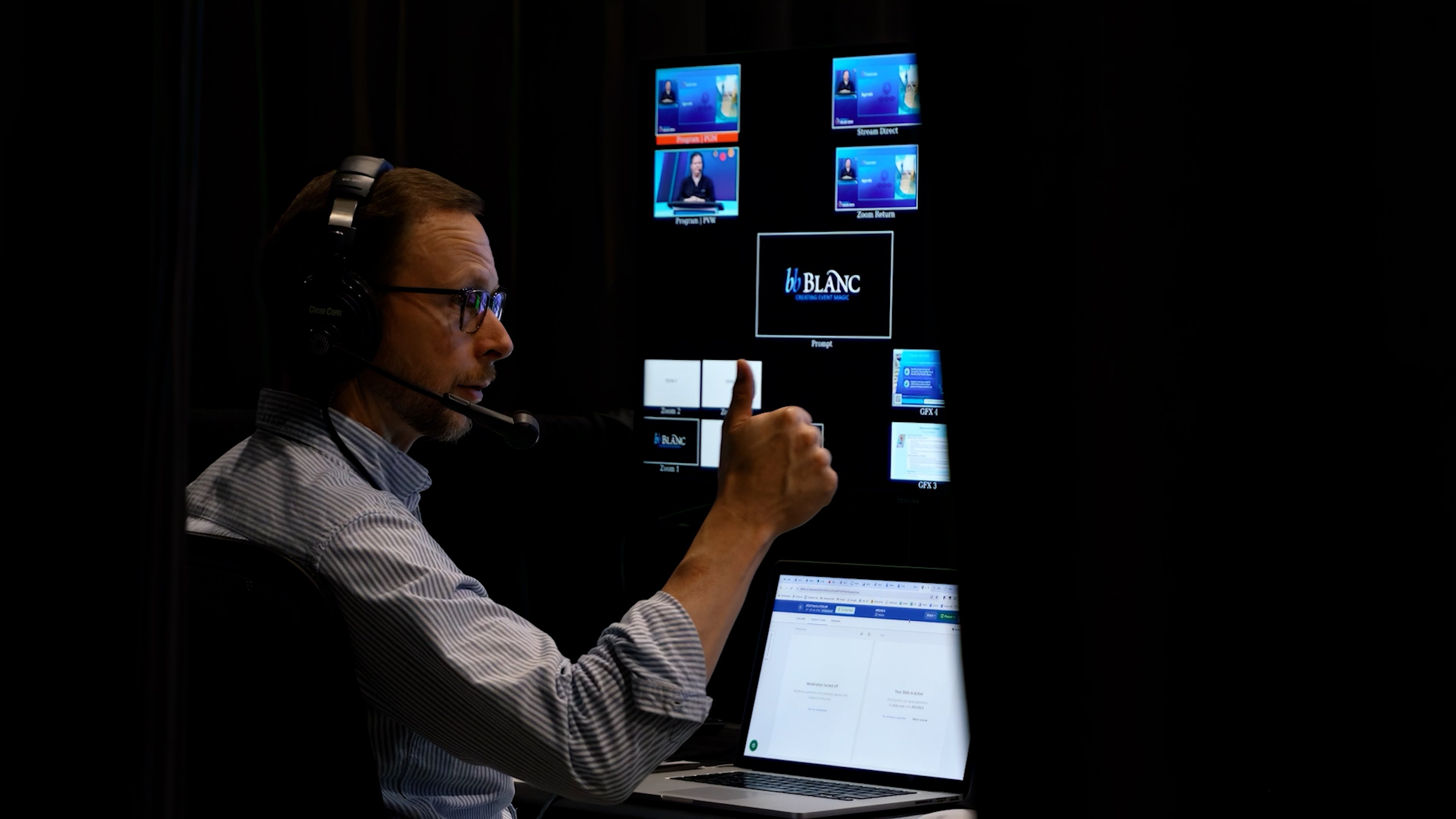
Video/Streaming OperatorManages content playback (slides, videos, graphics) - Integrates remote participant video - Monitors streaming quality and bitrates
Technical Director/Show CallerManages all technical cue coordination - Oversees redundancy and failover systems - Troubleshoots in real-time
Social/Chat ModeratorManages live chat and Q&A moderation - Feeds engaging questions to host - Creates engagement moments for remote audience
Our Hybrid Event Approach
Assessment and Strategy (4-6 weeks before)Understand your event goals and audience - Recommend venue-based vs. studio-based vs. hybrid approach - Plan content creation, interactive moments, and technical requirements - Provide budget and timeline clarity
Content and Technical Planning (6-4 weeks before)Develop production rundown (what happens when, what technology supports it) - Plan graphics, videos, and interactive elements - Set up all technical systems and test thoroughly - Conduct stakeholder meetings (speakers, hosts, sponsors) to brief them on hybrid logistics
Content Development (4-2 weeks before)Create all motion graphics, lower-thirds, intro videos - Prepare presentation templates and slide transitions - Conduct speaker rehearsals (introducing them to cameras, telepromters, if used) - Load all content into media servers and test playback
Technical Rehearsal (1 week before)Full dry run of the event with all production crew - Test all camera angles, lighting cues, audio mixing - Test streaming with anticipated viewer load - Test failover and redundancy systems - Identify and fix any issues
Load-In and Testing (day before or morning of)Final equipment setup and focus/alignment - Audio check with actual speakers - Lighting final tweaks for optimal appearance - Full internet bandwidth test - Streaming platform final check
Live Production (event day)Full production crew present and monitoring all systems - Real-time adjustments based on how speakers perform - Active engagement of remote audience through polls, Q&A, chat - Backup systems ready to deploy if primary systems fail - Post-event stream available for on-demand replay
Technology Stack bb Blanc Uses
We work with: - Streaming Platforms: Vimeo Live, YouTube Live, or custom platforms depending on client needs - Video Conferencing: Zoom or Teams for remote speaker integration - Media Management: Grass Valley Ignite or similar for content playback and graphics - Mixing Consoles: Yamaha or Allen & Heath for audio - Cameras: Canon or Sony broadcast quality - Encoding: Harmonic or Telestream encoding appliances with failover - Control: Crestron or Extron for master control and automation - CDN and Hosting: Akamai or similar for reliable distribution to remote viewers
The specific tools matter less than the expertise using them. Any professional production company should be fluent with modern tools and understand how they integrate.
At bb Blanc, we've delivered hybrid events for hundreds of organizations across Canada. We combine strategic production planning, broadcast-quality execution, and deep technical expertise to create connected experiences for both in-person and remote audiences. Learn more about our hybrid and virtual event capabilities through Studio 41, or explore our broader audiovisual production services technical management approach. We also offer guidance on enhances the entire hybrid experience.
FAQ

